App Builder
Open a project and you'll see the app builder, made up of four main sections: Action Bar, Plate, Canvas, and Panel.
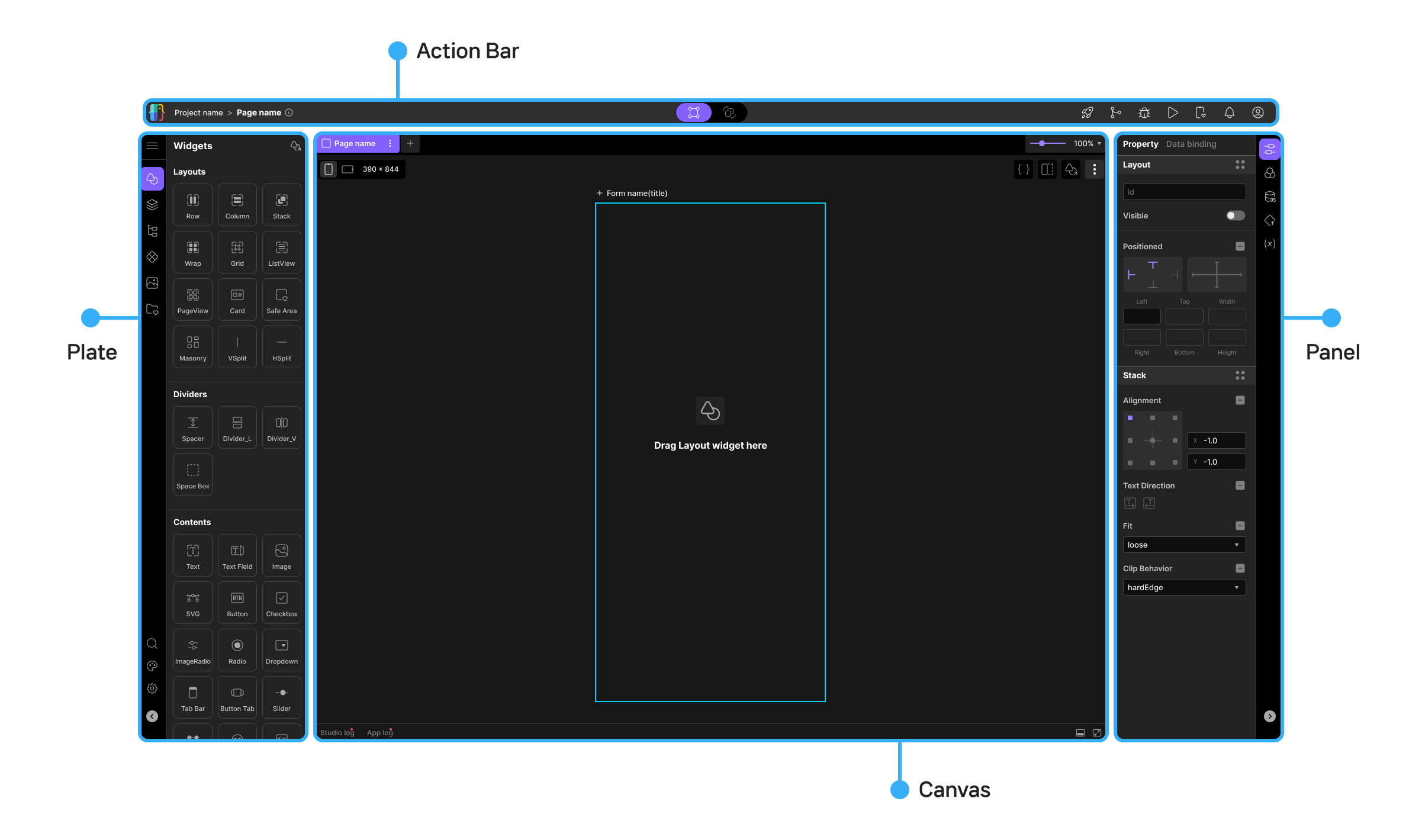
Action Bar
Action Bar is the toolbar at the top of the screen, designed to give you quick access to the key actions you need while working on a project.
- Role: Provides frequently used core functions — save, run, preview, and deploy — to make project work more efficient.
Plate
Plate sits on the left side of the screen, where you manage your projects and components in an organized folder structure.
- Role: Provides file management functions — creating, moving, and deleting project files — so you can see your project's overall structure at a glance.
- Key features: Create and manage pages, view the widget tree, and more.
Canvas
Canvas sits in the center of the screen — the main workspace where you design your UI by dragging and dropping widgets.
- Role: See your design results instantly with live preview.
- Key features: Provides an environment for building responsive layouts with ease.
Panel
Panel sits on the right side of the screen, letting you edit the detailed properties and behavior of the currently selected widget in real time.
- Role: Set and adjust properties like color, font, size, animation, events, and data binding for the selected widget, all through an intuitive interface.
Lucy Studio's app builder delivers intuitive design, powerful development tools, and real-time collaboration and version control — all in one place.
Experience a new standard for design, development, and collaboration!
- See each section below for detailed usage.